Docker : A tool every dev should know about
Nihal Gupta
Docker allows us to package an application along with the things it needs to run, instead of manually installing everything on every machine, we can define the environment once, then someone else can run the same environment on their machine.
In this article, we’ll understand:
- why we need Docker
- containerization
- Docker images and containers
- Docker vs virtual machines
- why containers are lightweight
- how Docker uses the OS kernel
- Docker Hub
- basic Docker commands
- port mapping
Why do we need Docker?
Let’s say you’re working on a project that requires nodejs v16, but you already have nodejs v22 installed
you have a few options -
1 — delete nodejs v22 and install nodejs v16
Now your current project might work. but another project on your laptop that requires node v22 might stop working, so changing the environment of your entire laptop for every project is not practical.
2 — use a VM
You can create a virtual machine and install a separate operating system inside it, then install nodejs, postgres , redis, dependencies inside that VM. This works, but a VM requires its own operating system and consumes more resources, imagine doing this for every project.
You could end up with -
Project 1 → VM Project 2 → VM Project 3 → VM Project 4 → VM
Each with its own operating system, now let’s look at another problem.
What if a project has many dependencies?
Suppose a project requires redis, kafka, python, Go, postgreSQL, nodejs Before you can even start working on the project, you have to, install each of the components with correct version , configure each component and then you’ll be able to run the project.
setting up the complete environment can itself become a painful task, docker provides a better solution for these problems.
What is containerization?
Docker runs applications inside isolated environments called containers. This approach is called containerization. Suppose without docker, running an application looks like this:
machine -> install runtime -> install dependencies -> configure services -> run application
With Docker, the required environment is already packaged, you can simply run the image and create a container.
Docker Image -> docker run -> docker container
What is a Docker Image?
A Docker Image is a template that contains everything required to run an application. Suppose your project requires nodejs, dependencies , code, configuration. All these things can be packaged into a Docker Image.
An image itself is not the running application, when we run an image, docker creates a container.
What is a Docker Container?
When we run a Docker Image, it runs inside an isolated environment, this environment is called a Docker Container.
A container can have its own:
- processes
- filesystem
- network
- dependencies
You can think of containers as separate environments running on your machine.

All these applications can run separately without directly installing them on your system in the usual way.
Docker Container vs Virtual Machine
Let’s first understand how a Virtual Machine works. your computer can be simplified into 3 layers, application layer, OS layer and hardware

When we create a Virtual Machine, we create a separate environment with its own guest operating system.
Conceptually,
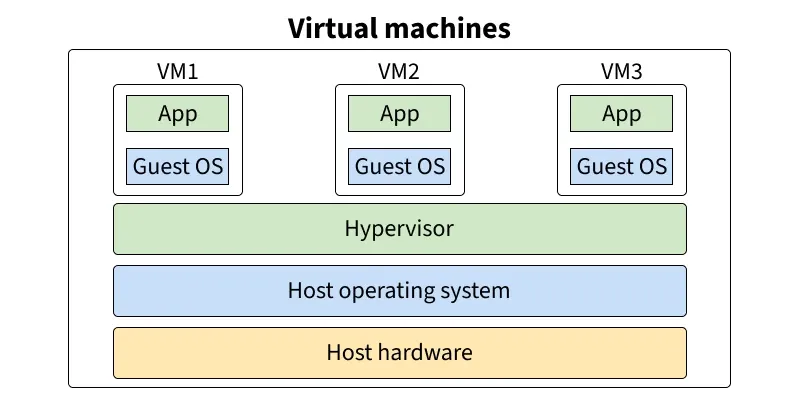
every VM needs its own guest OS, this increases resource usage. Now let’s look at containers.
How are Docker Containers different?
Docker containers don’t need to run a complete operating system kernel for every container. They use the host operating system’s kernel. So, instead of creating a complete guest OS for every application, containers isolate the application environment while sharing the underlying kernel.
This is why containers are generally more lightweight and faster to start compared to VMs. That’s why you can usually run many containers on a machine much more easily than running many VMs.
How does Docker isolate containers?
At a high level, docker uses OS features to isolate containers, you don’t need to understand everything initially, but there are two important concepts.
Namespaces: Namespaces provide isolation, for eg, a container gets its own view of things like:
- processes
- networking
- filesystem
The processes inside one container are isolated from another container.
cgroups: cgroups are used to control resources. for eg,
Container 1 Memory → 512 MB CPU → Limited
Container 2 Memory → 1 GB CPU → Limited
This allows us to control how much of the host’s resources a container can use.
Where do Docker Images come from?
When we upload source code of our project, we usually use github, similarly, when we want to share docker Images, we can use a container registry, the most popular one is Docker Hub Hub already contains images for many popular applications for eg, ubuntu, redis, postgres, nginx, etc So if you want to run redis locally, you don’t have to manually install redis, you can pull its image and run it inside a container.
Basic Docker commands
# pull an image
docker pull <image_name>
# for eg
docker pull redis

# specify a version
docker pull redis:7

# view downloaded images
docker images

REPOSITORY    TAG       IMAGE ID

redis         latest    abc123
ubuntu        latest    xyz456

#run an image
docker run redis

#shows running containers
docker ps

CONTAINER ID   IMAGE    STATUS

abc123         redis    Up 2 minutes

#shows all running containers including deleted ones
docker ps -a

#stop a container
docker stop abc123

#remove a container
docker rm <container_id>

#remove image from ur computer
docker rmi <image_id>

# run a container with custom name
docker run --name my-redis redis
Interactive mode
Sometimes we want to interact with the container, for eg, if we are running ubuntu and want to execute commands inside it
# run in interactive mode
docker run -it ubuntu

# -i → keeps STDIN open
# -t → allocates a terminal

# run commands like
ls
pwd
whoami
you are now interacting with the environment inside the container.
Detached mode
Normally, you don’t want every container to occupy your terminal, you can run it in the background using
# run in detached mode
docker run -d redis
# -d means detached mode.
How do we access an application running inside a container?
Containers run in an isolated environment, suppose an application inside the container is running on port 3000
How do we access it from our laptop? for this, we use port mapping.
docker run -p <host_port>:<container_port> <image_name>

#ex
docker run -d -p 3000:6379 --name my-redis redis
here, host port → 3000 container port → 6379
so anything that reaches, “localhost:3000” is forwarded to port 6379 inside the container redis uses port 6379 by default, which is why we’re mapping to that port the host port and container port don’t have to be the same.
This is only the theory part and some basics, once you understand these basics, the next things worth learning are Dockerfile, how to build your own image, volumes , docker compose, networking , and much more, I’ll probably cover these in another article.
for now, the best way to understand docker is pull different images, run containers, play with port mapping.